
Check Power Platform Subscription
Follow these instructions to check if you have a Power Platform subscription.
A Power Platform subscription is required if you want to test or deploy RapidStart or another solution based on RapidStart technology in your own (private) Microsoft 365 environment.
These instructions—which consist of 5 steps—apply exclusively to organizations with a business Microsoft 365 subscription.
Power Platform Licensing Requirements
Any of the following Power Platform licenses is sufficient to cover the core functionality required for RapidStart Apps and related solutions:
- Power Apps Per User
- Power Apps Per User Trial / Evaluation
- Power Apps Premium
- Power Apps Premium Trial / Evaluation
- Power Apps Pay-As-You-Go
Any additional licensing requirements for certain features are clearly indicated.
Step 1 of 5
Sign in to the Microsoft 365 portal with your business Microsoft 365 account. Use the link below to do so.
Step 2 of 5
In the same browser window where you're signed in to Office, open the Power Apps Maker portal. When prompted for credentials, enter your Microsoft 365 work credentials . Use the link below to do so.
Step 3 of 5
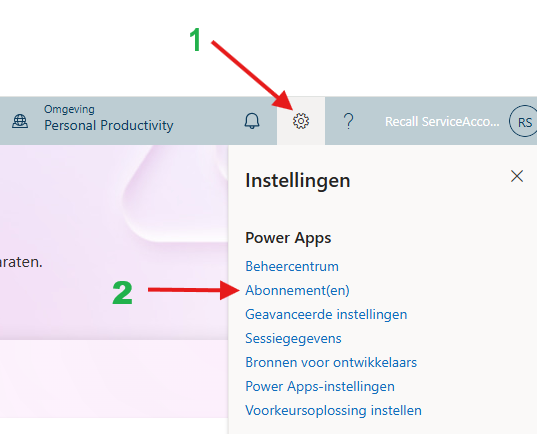
Click on the Settings / Settings gear icon and then select Subscription(s) / Subscription(s).
Step 4 of 5
Take a 'screenshot' of the displayed subscriptions and save it locally.
Step 5 of 5
‘Upload’ Upload this screenshot (or these screenshots) in the contact form when prompted.